llms.txt
A plain-text file at the root of your site that tells AI models which URLs are worth reading.
Full definition
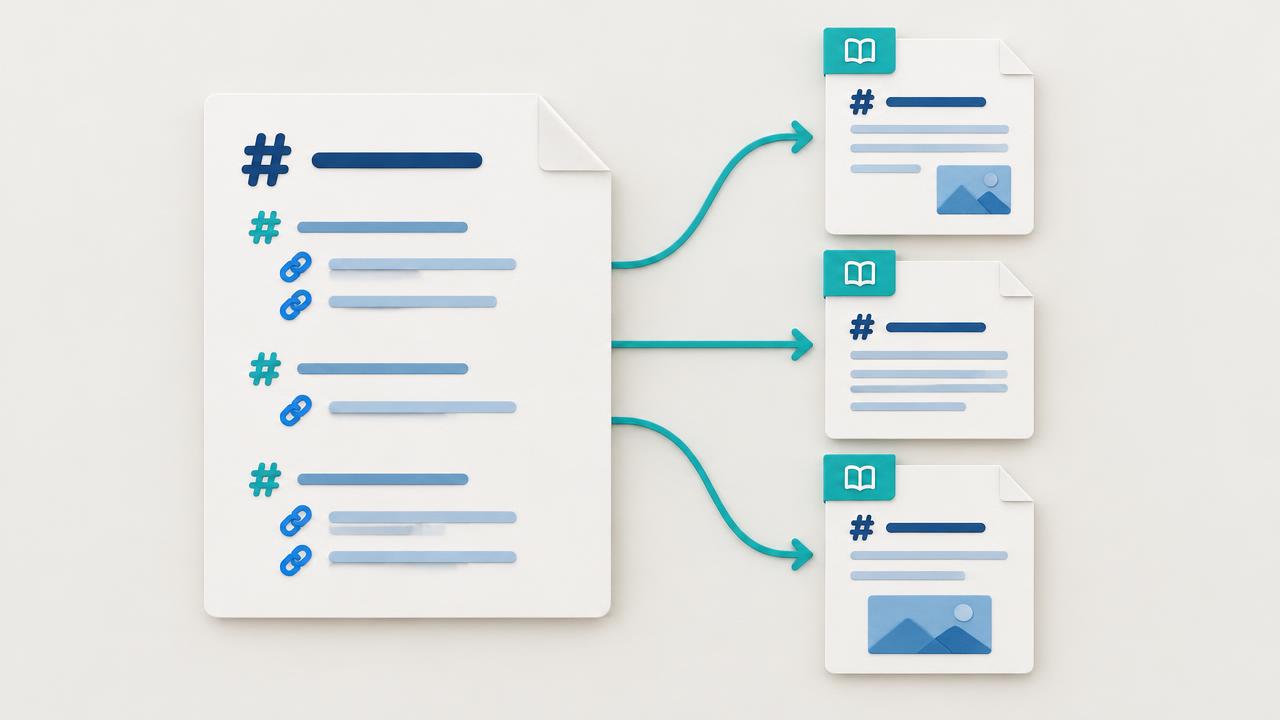
llms.txt is a community standard (originally proposed by Jeremy Howard) for a Markdown-formatted file served at /llms.txt. It lists the most important URLs on your site — docs, key landing pages, changelogs — with short descriptions so AI models can find the high-signal content quickly without crawling everything.
AI models have limited context windows. When they decide what to ingest from your site, llms.txt is a curated short list that vastly outperforms whatever they'd discover from sitemap.xml alone. Sites with a well-maintained llms.txt get cited disproportionately often.
Example
/llms.txt → # Acme\n\n## Docs\n- [Getting started](https://acme.com/docs/start): 5-minute setup guide\n- [API reference](https://acme.com/docs/api): Full REST API spec
Related terms
Generative Engine Optimization — optimizing for citation by AI chat, search, and assistants.
Answer Engine Optimization — optimizing for direct-answer surfaces like AI assistants and voice search.
Google's AI-generated answers that appear above the classical search results.
OpenAI's web crawler that gathers training data for ChatGPT models.
Put it into practice
Run a free OptimAIze scan to see how your site handles llms.txt and the rest of the GEO checklist.
Run free scanFrequently asked questions
Is llms.txt the same as SEO?
No. llms.txt is one piece of the broader GEO (Generative Engine Optimization) program that sits on top of classical SEO. The two work together — classical SEO gets you crawled and indexed; llms.txt is part of what gets you cited by AI engines.
Do I need a tool to implement llms.txt?
For most teams, a free scanner like OptimAIze is enough to identify what's missing. Implementation is usually a copy-paste of generated markup or a small code change — no specialist tool required.
llms.txt: practical verification
Apply this checklist to llms.txt, keeping the relevant page URL, audience language and verification date. Check the topic-specific information above before using a general recommendation. Record the actual output and cited sources; do not infer a ranking or a market benchmark from a technical score.
Understand the mechanism before choosing a tactic
AI-search terms often describe different layers of a system. Crawling retrieves a page; indexing organizes available information; retrieval selects material for a question; generation produces an answer. A citation is an attribution in that answer, not proof of all preceding steps. Definitions are useful when they help you locate a problem, choose an appropriate check and avoid claiming more than the evidence shows.
Common confusions that lead to the wrong fix
llms.txt is a proposed content guide, while robots.txt communicates crawl preferences. GPTBot and a search-facing crawler can have different purposes. Structured data describes visible entities and facts; it is not a hidden prompt or a guaranteed AI-ranking boost. sameAs should identify authoritative profiles of the same entity, not unrelated backlinks. A valid FAQPage or HowTo document is not a promise of a Google rich result or an AI citation.
Apply a definition to one observable example
If a response mentions your brand without linking, record a mention rather than a source citation. If a robots rule allows a crawler but the URL returns a firewall challenge, investigate access rather than rewriting an FAQ. If a schema validator reports valid JSON, inspect whether the properties describe the page truthfully; syntax validity does not establish factual accuracy. Matching the term to concrete evidence makes the next action clearer.
Keep terminology current and evidence traceable
Vendor names, crawler policies and search features change. Use primary documentation for technical details and record when you checked it. Treat third-party experiments as observations with a sample and methodology, not universal ranking rules. When a definition includes a number or performance claim, verify the original source, population and time period. If those are missing, explain the concept without inventing a benchmark.
Evidence and next actions
| Check | Evidence to retain | Action |
|---|---|---|
| Crawl access | Status, response body and applicable rules | Resolve actual retrieval barriers |
| Index discovery | Sitemap URLs and available index evidence | Distinguish discovery from inclusion |
| Structured data | Visible facts and matching JSON-LD | Fix truthfulness as well as syntax |
| Citation | Saved answer with a source-linked URL | Check attribution and source relevance |
| Readiness score | Documented checks used by the tool | Treat it as a diagnostic, not a ranking |
Implementation checklist
- Identify which system layer a term describes.
- Use a concrete example to test your interpretation.
- Read the primary specification or vendor documentation.
- Avoid unsupported percentage or ranking claims.
- Separate observed results from proposed mechanisms.
A repeatable workflow
- 1Establish a baseline
Save the page URL, date, language, target market and exact questions before editing. Record what the page actually says and what each tested answer cites; a mention without a source link is not a citation.
- 2Make one coherent change
Resolve the clearest failure first, then check the published page rather than only an editor preview. Keep an implementation log so unrelated redesigns, campaigns or product changes are not mistaken for the effect of this work.
- 3Repeat and compare
Repeat the same questions and technical checks after deployment. Keep engines and measurement conditions consistent, report sample size, and inspect answer accuracy alongside citations. A single response is not a stable ranking.
More questions answered
- Does this guarantee an AI citation?
- No. A crawlable, accurate page can still be omitted. Retrieval, source selection and generated answers vary between products and requests; these checks improve the evidence available, not guarantee placement.
- How do I tell whether an improvement worked?
- Compare like-for-like checks and retain the underlying evidence. Track correct brand mentions, source-linked citations and qualified referral visits separately. Do not call a technical score a traffic forecast or attribute every change to one edit.
Explore further
Connected guides to keep going — short reads, all internally linked.